
What Does It Mean When Your Septic Alarm Goes Off? (2026 Homeowner Guide)
Imagine it’s a quiet evening when a piercing, high-pitched buzz suddenly echoes from your yard or laundry room. It’s a sound that instantly triggers a knot in your stomach because you know it’s not just a simple smoke detector. You’re likely standing there asking, what does it mean when your septic alarm goes off, and more importantly, how do you make it stop? We know that initial wave of panic. It’s frustrating to deal with a loud, persistent alarm, especially when you’re worried about the potential for a messy sewage backup into your home.
You aren’t alone in this. Most homeowners feel a mix of confusion and dread when their system starts signaling for help. This guide is designed to be your calm in the storm. We’ll show you exactly how to silence the noise, how to diagnose the difference between an aerobic air compressor failure and a high-water alert, and what immediate steps you must take to protect your property. From understanding Texas maintenance requirements to identifying true emergencies, you’ll gain the clarity needed to get your system back to normal operation without the guesswork.
Key Takeaways
- Understand exactly what does it mean when your septic alarm goes off and how it acts as a critical 24-hour warning window for your home.
- Learn the immediate steps to silence the loud buzzer and safely inspect your control panel for simple electrical issues like tripped breakers.
- Identify the most common triggers for alerts in East Texas, including high water levels after heavy rain and mechanical pump failures.
- Use the “12-hour rule” to distinguish between a temporary system overload and a true emergency that requires professional repair.
- Discover how proactive maintenance and regular pumping can prevent messy backups and keep your septic system running smoothly for years.
Understanding Your Septic Tank Alarm: An Early Warning System
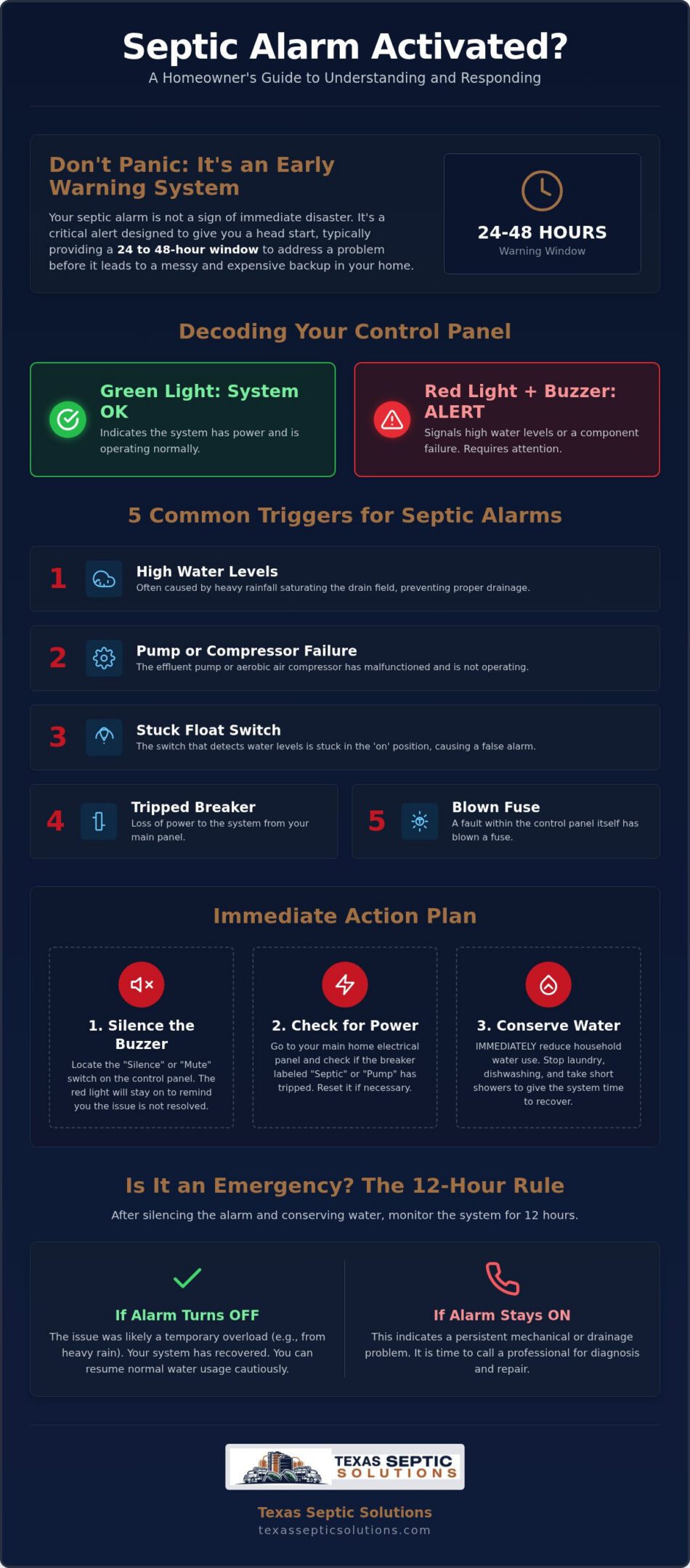
Your septic alarm isn’t there to ruin your day; it’s actually your property’s first line of defense against a major headache. When you hear that buzzing sound, you might wonder, what does it mean when your septic alarm goes off? Essentially, this safety device is designed to monitor the internal health of your system and alert you to high water levels or mechanical failures before waste has a chance to back up into your home. Most modern setups consist of three main parts: a control panel, a float switch inside the tank, and an audible or visual alarm unit. It acts as a “buffer alert,” giving you a crucial window of roughly 24 to 48 hours to address the issue before the tank reaches its absolute capacity.
Understanding the basic function of your Septic tank is the best way to stay calm when the buzzer sounds. These alarms are most common in aerobic systems or conventional systems that require an effluent pump to move waste to an uphill drain field. Instead of waiting for a slow drain or a foul odor in the yard, the alarm gives you a proactive head start. It’s a specialized tool that ensures your home remains functional while you coordinate a repair or a maintenance visit.
How Septic Alarms Work in Aerobic vs. Conventional Systems
In East Texas, many homeowners rely on aerobic systems, which are more complex than older gravity-fed designs. In these systems, the alarm often monitors two things at once: the air compressor and the water levels. If the compressor stops providing oxygen to the beneficial bacteria, or if the water level rises too high, the alarm triggers. Conventional systems typically only use an alarm if they have a pump chamber. If you have a standard gravity system with no pump, you might not have an alarm at all. Knowing which system is buried in your yard is the first step in troubleshooting why that buzzer is active.
The Meaning of Different Lights and Sounds
The control panel uses a simple color-coded language to tell you what’s happening underground. A green light is your best friend; it usually signifies that the system has power and is operating normally. If a red light appears, it indicates a high-water condition or a specific component failure that needs your attention. This red light is almost always accompanied by a loud audible buzzer designed to grab your attention immediately. While it’s tempting to just silence the noise and walk away, the red light stays on as a reminder that the underlying problem hasn’t disappeared. Understanding what does it mean when your septic alarm goes off helps you react with the right level of urgency rather than jumping straight to panic.
Why Is My Septic Alarm Going Off? 5 Common Triggers
When that piercing buzzer starts, your mind probably jumps to the worst-case scenario. Understanding what does it mean when your septic alarm goes off starts with identifying the most likely culprits. In our experience across East Texas, five main triggers cause the vast majority of these alerts. High water levels are the number one cause, but mechanical pump failure, stuck float switches, tripped electrical breakers, or blown fuses in the control panel are also frequent offenders. Each of these issues requires a different approach, but they all share one goal: alerting you before a backup reaches your bathtub.
Drain Field Saturation and Heavy Texas Rainfall
Houston and Cleveland are no strangers to sudden, intense storms. When we get several inches of rain in a short window, the soil in your drain field can become completely saturated. This is a major problem because a septic system relies on the soil’s ability to absorb and filter effluent. If the yard is underwater, your system can’t “breathe” or discharge waste. This leads to a backup into the tank, which lifts the alarm float. To prevent long-term damage, you should follow the EPA’s guidelines to Care for Your Septic System, which includes managing runoff away from your drain field.
If you suspect your drain field is saturated, the best thing you can do is immediately reduce your indoor water usage. Stop running the dishwasher, delay laundry day, and keep showers short. This gives the soil time to drain and the tank levels a chance to recede. If you find your yard stays swampy long after the rain stops, it might be time to schedule septic system maintenance to check for deeper drainage issues.
Pump and Float Switch Malfunctions
Inside your pump chamber, a series of floats act as the “brain” of the operation. Usually, there’s an “On/Off” float that tells the effluent pump when to run and an “Alarm” float that sits higher up. If the On/Off float becomes tangled or buried under a thick layer of grease and debris, it won’t trigger the pump. The water will continue to rise until it hits that secondary alarm float, triggering the buzzer. This doesn’t always mean your pump is dead, sometimes the float just needs a good cleaning or repositioning.
However, if your pump has reached the end of its typical 8 to 12-year lifespan, it may simply burn out. Signs of a failing pump include a humming sound from the tank without any water movement or a breaker that trips every time the pump tries to kick on. Addressing these mechanical issues early is much cheaper than dealing with the property damage caused by a full system failure. Knowing what does it mean when your septic alarm goes off helps you decide whether you’re looking at a simple float adjustment or a necessary pump replacement.
Immediate Action Plan: What to Do When the Buzzer Sounds
The moment that alarm starts screaming, your priority shifts from curiosity to containment. When you’re standing in front of the panel wondering what does it mean when your septic alarm goes off, the first thing you should do is locate the “Toggle” or “Silence” switch. Flipping this switch will stop the audible buzzer, but it won’t turn off the warning light. This is a deliberate safety feature. While the silence brings peace to your backyard, the red light serves as a constant visual reminder that your system still needs attention. Once the noise is gone, head to your home’s main electrical panel. Check for any tripped breakers labeled “Septic,” “Pump,” or “Aerator.” If a breaker has tripped, flip it back on once; if it trips again immediately, you likely have a short circuit that requires professional eyes.
After checking the power, walk out to the tank area. You’re looking for obvious signs of trouble like standing water, soggy soil over the tank lids, or a foul odor. Understanding Septic System Basics can help you identify which part of the yard corresponds to the tank versus the drain field. If you see effluent bubbling up to the surface, you have a true emergency on your hands. If the light remains red after your initial checks, it’s time to contact a professional for septic system repair to prevent a total backup.
Step 1: Implementing Emergency Water Conservation
If the alarm is on, your tank is currently struggling to process the volume of waste inside. You must stop all laundry and dishwashing cycles immediately. These appliances send massive “slug loads” of water into the tank, which can push a high-water situation into a full-blown backup. Limit everyone in the house to showers under 3 minutes and avoid flushing the toilet unless it’s absolutely necessary. This “water rest” is essential, especially if a recent storm has saturated your drain field. By cutting off the flow, you give the system a chance to catch up and drain naturally.
Step 2: Checking the Control Panel and Breakers
Your control panel is the dashboard of your septic system. Look for a “Test” button; pressing this should trigger the light and buzzer, confirming that the alarm system itself has power. For those with aerobic systems, check the air compressor. You should feel a slight vibration or hear a steady hum coming from the housing. If the compressor is silent and cold, that’s likely why your alarm is triggered. The “Silence” button is a temporary fix that does not solve the underlying issue. It simply buys you time to investigate the cause without the headache of a constant siren.
Troubleshooting the Alarm: Glitch vs. System Emergency
Not every alarm signal means your yard is about to flood. Sometimes, it’s just a temporary glitch caused by a power surge or a nearby lightning strike during a typical East Texas storm. What does it mean when your septic alarm goes off during a dry week versus a rainy one? In Houston and Cleveland, our heavy downpours often overwhelm the soil. If it’s been raining hard, your system might just be struggling with excess groundwater. We recommend following the “12-Hour Rule”: stop all indoor water use for 12 hours. If the light turns green after that period, your pump simply needed time to catch up with the hydraulic load. If the alarm persists, you have a mechanical or electrical issue that won’t go away on its own. One of the best ways to avoid these stressful moments is to stay ahead of the curve with a septic system maintenance plan.
Red Flags That Signal an Imminent Backup
While you wait for the 12-hour window to pass, keep a close eye on your plumbing. Gurgling sounds in your toilets or drains when you flush are a major warning sign. This happens when air is trapped in the lines by rising water levels in the tank. If you notice sewage odors inside your home or see water slowly backing up into your lowest shower or bathtub, stop all water use immediately. These are not glitches; they are signs that your system is at its absolute limit. If you see these signs, you need a professional to intervene before the situation gets messy.
When a “Glitch” Is Actually a Blown Fuse
Sometimes the alarm is triggered because a fuse has blown inside the control box. You can safely check the internal fuses by opening the panel and looking for any blackened glass or broken filaments. However, safety is paramount. Never stick a screwdriver or any metal tool into the panel while the power is on. Check both the “Pump” breaker and the “Alarm” breaker in your main electrical box. If the pump breaker is off but the alarm is on, the tank will fill up without the pump ever knowing it needs to work. This simple electrical check can often save you from an unnecessary emergency call.
If you’re seeing red lights and the 12-hour rest didn’t help, don’t wait for a backup to happen. Contact Texas Septic Solutions for professional troubleshooting and 24/7 support today.
Restoring Your System: Professional Repairs and Prevention
Sometimes, your best DIY efforts aren’t enough to solve the problem. If you’ve followed the 12-hour rule and the red light is still glaring at you, it’s time to stop troubleshooting and seek professional septic tank alarm help. When we arrive at a property, one of the first things we check is the sludge level. If your tank hasn’t been pumped in years, solid waste can accumulate until it blocks the effluent pump or prevents the float switches from moving freely. In these cases, professional septic pumping is the only way to clear the high-water alarm and reset the system. It’s a straightforward fix that restores the “buffer capacity” your tank needs to handle daily water use.
For homeowners looking for long-term peace of mind, we often recommend upgrading to a modern alarm system. Modern control panels can now include remote monitoring capabilities and smart sensors. These systems can alert your phone the moment a pump starts to draw too much power or a float fails, often before the audible buzzer even sounds. Staying ahead of the curve with these technological advancements turns a potential disaster into a simple scheduled repair. In Texas, specifically under TCEQ regulations, maintaining your system isn’t just about convenience; it’s a legal requirement for aerobic systems to have a maintenance contract with inspections every four months.
When to Call for 24/7 Emergency Septic Service
If you see water actively backing up into your home’s lowest drains, you are facing a Category 3 water emergency. This is a health hazard that requires immediate intervention. We provide rapid response calls in Cypress, Huffman, and the surrounding East Texas areas to prevent property damage. When you call our dispatcher, tell them exactly what you see. Is there standing water in the yard? Is the air compressor silent? Knowing whether you have an aerobic or conventional system helps our technicians bring the right parts, such as a specific effluent pump or a replacement aerator, on the first trip.
Proactive Maintenance to Prevent Future Alarms
The best way to handle a septic alarm is to make sure it never goes off in the first place. You should schedule regular pumping every three to five years to prevent solids from reaching your pump chamber. Additionally, cleaning the effluent filter every six months is a simple task that ensures smooth water flow to your drain field. For a full breakdown of what your system needs throughout the year, consult our Septic System Maintenance Texas Guide. This seasonal checklist helps you stay compliant with state laws while protecting your home’s most vital utility. Understanding what does it mean when your septic alarm goes off is the first step, but consistent care is what keeps your backyard quiet and your home safe.
Take Control of Your Septic System Health
Hearing that high pitched buzzer can be stressful, but now you know exactly what does it mean when your septic alarm goes off. It’s your system’s way of asking for help before a minor issue turns into a major property emergency. By silencing the alarm, implementing water conservation, and checking your breakers, you can manage the situation with confidence. Whether you’re dealing with heavy Houston rainfall or a mechanical pump failure, remember that your alarm is a vital safety net designed to protect your home from messy backups.
Don’t let a red light keep you up at night. As a locally owned and operated authority, we specialize in expert troubleshooting for all aerobic and conventional systems. We provide rapid response for residents in Houston, Cleveland, and the surrounding areas to get your utilities back to normal operation quickly. Need immediate help? Contact Texas Septic Solutions for 24/7 Emergency Service! You’ve got the tools to handle the buzzer, and we’re always here to handle the heavy lifting. Your septic system is in good hands.
Frequently Asked Questions
How long can I use water if my septic tank alarm is going off?
You generally have a 24 to 48 hour buffer once the alarm sounds, but this isn’t a guarantee. This reserve capacity allows for minimal water use like hand washing or quick flushes. You should immediately halt laundry, dishwashers, and long showers to prevent the tank from overflowing. If you continue using water at a normal rate, you risk a messy backup into your lowest drains much sooner than expected.
Can heavy rain cause my septic tank alarm to go off in Texas?
Intense rainfall in areas like Houston and Cleveland frequently triggers these alarms. When the ground becomes saturated, excess water can leak into the tank through small cracks or unsealed lids, a process known as infiltration. This artificially raises the water level and lifts the float switch. If you’re wondering what does it mean when your septic alarm goes off after a storm, it usually means your system is temporarily overwhelmed by groundwater.
Is a septic tank alarm an immediate emergency?
Think of your alarm as a 24-hour warning window rather than an instant catastrophe. It’s designed to give you enough time to call a professional before sewage actually enters your home. If you’re asking what does it mean when your septic alarm goes off, it’s usually an early warning to stop all non-essential water use. It only becomes a true emergency if you see water backing up into your sinks or tubs.
What does a red light on my septic control panel mean?
A red light is the universal signal for a high water condition or a mechanical failure. In many aerobic systems, this light stays on until the water level drops below the alarm float or the failing component is repaired. It often works in tandem with the audible buzzer to ensure you don’t miss the warning. If the light remains on after 12 hours of zero water use, your pump or float likely needs professional repair.
Why is my septic alarm buzzing but there is no red light?
If you hear a buzz without a red light, your system might be signaling an air compressor failure. Many aerobic control panels use different signals for “high water” versus “low air pressure.” Check your aerator for vibrations or humming. If the compressor has stopped, the alarm will sound to prevent the beneficial bacteria from dying off. In some cases, this can also indicate a specialized timer or electrical glitch within the panel itself.
Can I reset my septic alarm myself?
You can silence the audible buzzer using the “Silence” switch, but this doesn’t reset the actual problem. If a power surge caused the alarm, you might try flipping the septic breaker in your home’s main electrical panel. However, if the red light stays on, the system is still detecting a fault. Never attempt to rewire the control panel yourself; high voltage and moisture make this a dangerous task for anyone but a licensed technician.
What happens if I ignore my septic alarm for too long?
Ignoring the signal can lead to a Category 3 water backup, which involves raw sewage entering your home through showers and toilets. Beyond the health risks and cleanup costs, a neglected high water situation can permanently damage your drain field. If the pump isn’t working, solids can carry over into the soil pipes and clog them. This turns a simple pump repair into a much more expensive system replacement that could have been avoided.
How much does it cost to fix a septic alarm issue?
The total cost depends entirely on whether you’re dealing with a simple float adjustment, a blown fuse, or a complete pump replacement. While minor electrical fixes are relatively affordable, replacing a heavy-duty effluent pump is a more significant investment. Industry professionals report that catching the issue early through the alarm system is always cheaper than paying for emergency remediation after a backup has already occurred. Regular maintenance is your best financial defense.