
Septic System Care for Homes with Backup Generators in Cypress
What if your backup generator is running, but your septic system still isn’t protected? In Cypress, septic system care for homes with backup generators Cypress begins with knowing which parts of the system rely on electricity. Aerobic systems may use powered aerators, pumps, and control panels, while gravity-fed systems may operate differently during an outage.
An outage can make everyday water use a concern, particularly if powered equipment stops moving wastewater. It’s understandable to wonder whether an alarm means a failure, what to do while the power is out, and how to tell if the system is operating normally once power returns. A generator can support compatible equipment when set up and operated as directed, but it doesn’t replace routine maintenance or a professional assessment.
This guide covers how system design shapes generator planning, what to do before and after an outage, and when warning signs call for professional attention. Use the checklists to prepare your household and keep your response grounded in your system’s records and instructions.
Key Takeaways
- Before an outage, locate your septic records and identify any pumps, controls, or alarms that may need power.
- Generator planning for septic system care for homes with backup generators Cypress depends on the system and equipment installed.
- After power returns, watch for warning signs from a safe distance. Don’t open or modify septic equipment yourself.
- Persistent alarms, unusual odors, backups, or pooling wastewater are reasons to arrange a professional assessment.
- Include routine maintenance in your preparedness plan. Texas Septic Solutions recommends pumping every 2-3 years on average, depending on water usage.
How Backup Generators Affect Septic System Care in Cypress Homes
Generator-related septic care means planning for the parts of your wastewater system that may need electricity during an outage. A generator can power compatible electrical equipment, but it doesn’t pump a tank, inspect a drainfield, or diagnose a failing component. Septic system care for homes with backup generators Cypress homeowners can rely on includes both power readiness and routine maintenance.
Start with what’s installed rather than assuming every septic system works the same way. System records, service reports, and equipment instructions can help you identify powered components and understand what to monitor if electricity is interrupted. A generator is one part of outage preparation, not proof that the entire system is protected.
Which septic system components may depend on electricity?
Some systems have powered pumps, controls, or alarms. For example, an aerobic system may use an aerator and an effluent pump, while a gravity-fed arrangement generally relies on gravity to move wastewater. Designs and equipment vary, so check the records for your property. For a basic overview of septic system parts and function, see Understanding Septic Tanks.
Gather installation documents, service notes, and equipment instructions to identify what’s installed. Note the location of pumps, control panels, and alarms without opening or adjusting them. If your records don’t make the system type clear, a septic inspection can help establish what equipment is present and whether it needs attention. A quiet alarm or running generator alone doesn’t confirm that everything is operating normally.
Why a backup generator is only one part of preparedness
A generator may supply power to compatible septic equipment, but it doesn’t take care of the tank or drainfield. Routine maintenance and inspections help assess the system as a whole and identify concerns that backup power cannot address. Keep the generator’s instructions with its records and the septic equipment’s instructions with the septic records.
Generator planning must match the installed septic system. Equipment and power needs depend on the system’s design and components, so a general checklist cannot confirm that a setup is suitable for every home. Keep a record of what your system contains and how it should operate. If power returns but an alarm remains active, or you notice a backup or other warning sign, don’t assume the system is working normally. A professional assessment can determine whether maintenance or repair is needed.
In Cypress, a dependable plan combines generator readiness with scheduled septic care. Backup power supports electrical equipment; inspections, maintenance, and pumping address other needs of the system.
Prepare a Cypress Septic System Before a Power Outage
Preparation is easier before the power goes out, when you have time to identify your septic equipment and read its instructions. A clear plan helps your household avoid guesswork about what the system needs and what to do during an interruption. This checklist supports septic system care for homes with backup generators Cypress homeowners can prepare in advance.
Identify the septic system’s power-dependent equipment
Start with property records, not the appearance of a tank or yard lids. Equipment may be located elsewhere on the property, and a visual check cannot show how the whole system is designed. Gather installation documents, service records, and equipment manuals. The EPA’s septic system guidance also covers general care and maintenance practices to include in your plan.
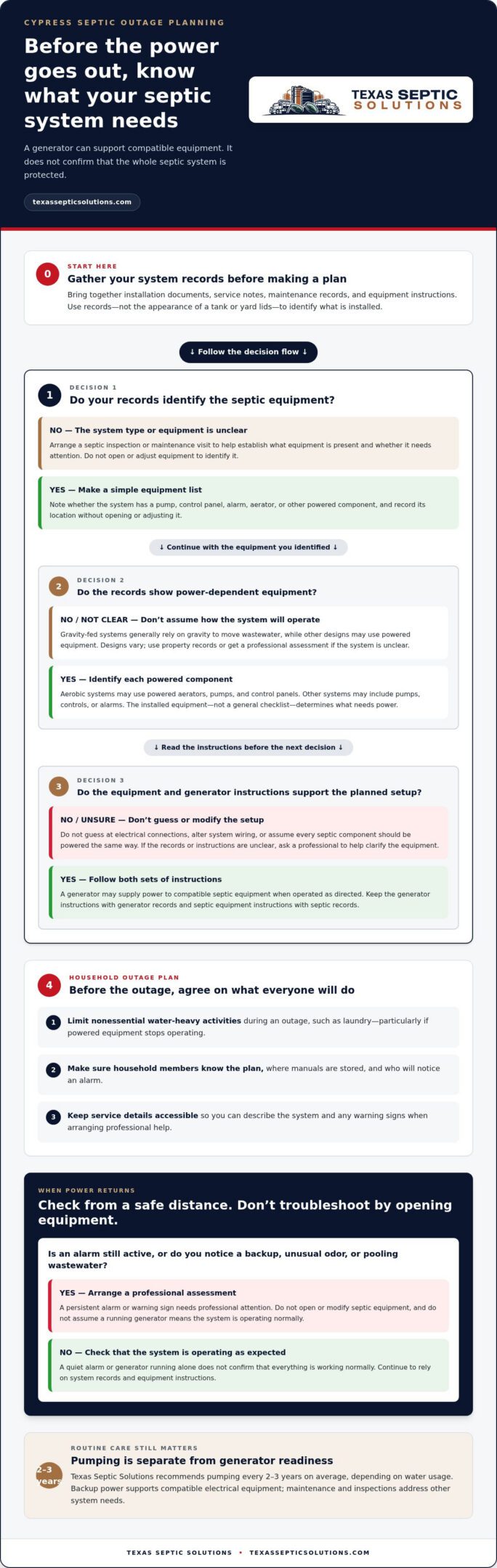
Outage planning starts with knowing which septic components require power. Use this sequence to get organized:
- Locate system documentation. Keep installation paperwork, inspection notes, maintenance records, and equipment instructions together somewhere household members can access.
- Identify the equipment. Use the records to find out whether the system has a pump, control panel, alarm, or other powered component. Note its location without opening or adjusting it.
- Read the instructions. Review the septic equipment manufacturer’s guidance for normal operation and alerts. Separately, read the generator manufacturer’s instructions for safe operation.
- Agree on household water use. Decide in advance to postpone nonessential water-heavy activities, such as laundry, during an outage. Make sure everyone knows the plan, particularly if powered equipment stops operating.
- Save useful contacts and records. Keep maintenance details and service information accessible so you can describe the system and any warning signs when arranging professional help.
Make an outage plan that protects the system
A generator can support septic equipment only when it’s operated according to its instructions and used with equipment suited to the installed system. Don’t guess at electrical connections, alter system wiring, or assume every septic component should be powered the same way. If you’re unsure what your records mean, a septic inspection or maintenance visit can help clarify the system’s equipment and condition.
Keep the household plan simple: know which water uses to limit, who will notice an alarm, and where the manuals are stored. When utility power returns, check that the septic system is operating as expected. A persistent alarm or signs of a backup call for professional assessment, not trial-and-error adjustments.
Regular septic system maintenance helps keep system records and condition current as part of outage readiness. Pair routine care with safe generator operation so you’re better prepared when the power goes out.
Compare Septic System Needs When the Generator Is Running
A generator’s role depends on the septic equipment it supports. Some systems use powered components to move or treat wastewater, while systems documented as gravity-fed may rely more on gravity for wastewater flow. These are planning categories, not guarantees about how a particular system behaves. Check your records and equipment instructions before deciding what needs power during an outage.
The comparison below can help you identify questions to answer for your system. Generator needs depend on installed equipment, not the septic label alone.
| System setup | What to consider while the generator is running |
|---|---|
| System with a pump, control, or alarm | Identify the components in your records and follow their operating instructions. If an alarm activates, treat it as a warning to consult the system’s guidance, not as a diagnosis of the cause. |
| System documented as gravity-fed | It may have fewer powered components involved in wastewater movement, but verify the equipment actually installed. Continue routine septic care and don’t assume the system will operate without interruption. |
Systems with pumps, controls, or alarms
Powered equipment makes system-specific outage planning especially important. A pump, control panel, or alarm may serve a different function depending on the system, so don’t infer its role from appearance alone. An alarm signals a condition that needs attention; it doesn’t identify the cause or confirm that the generator is powering the right equipment. Follow the septic manufacturer’s instructions and avoid unverified resets or adjustments.
Use the generator only as its manufacturer directs. Keep its safety instructions separate from the septic system’s operating guidance, and don’t improvise electrical connections. If an alarm persists or equipment behaves differently than the instructions describe, arrange a professional assessment instead of guessing.
Systems with fewer powered components
A system documented as gravity-fed may have fewer electrical demands for moving wastewater, but it still needs routine inspections, pumping, and drainfield care. It may also include equipment that needs electricity. Even where fewer components are powered, don’t assume the system will operate without interruption during an outage. Household water use and the system’s condition still matter.
For septic system care for homes with backup generators Cypress residents should use system records to distinguish what the septic equipment needs from what the generator can safely support. A label such as “conventional” or “aerobic” isn’t a substitute for identifying the equipment at the property. Follow the generator manufacturer’s safety instructions and the septic system’s own operating guidance. If the system setup or an alarm remains unclear, a professional inspection can help establish its condition and next steps.
What to Check After Power Returns to Your Cypress Home
Once utility power is back, observe your septic system before assuming everything has returned to normal. A visual check can help you spot a warning sign, but it can’t confirm the cause or condition of equipment. For septic system care for homes with backup generators Cypress residents should keep this check cautious: observe from a safe distance, follow equipment instructions, and leave diagnosis and repairs to a professional.
Look around the home and yard without opening tanks, control panels, or other equipment. Don’t reset, rewire, or modify septic components unless the manufacturer’s instructions specifically direct a safe action for you to take. Note what you see and when it started. Those details can help a service professional assess the issue.
- Check the alarm. Notice whether it remains active or sounds again after power returns. An alarm signals a condition that needs attention, but doesn’t identify the cause. Follow the system’s instructions and review this septic tank alarm guidance for next steps.
- Watch for household backups. Note any wastewater backing up into plumbing fixtures. Avoid continued use of affected fixtures and arrange an assessment.
- Look for unusual odors. Report a persistent sewage-like smell near the home or system, even if you can’t locate its source.
- Observe the yard. From a safe distance, look for pooling water or unusually wet areas near septic components. Don’t walk through standing wastewater or touch it.
- Keep people and pets away. Avoid contact with sewage or wastewater and keep others clear of affected areas until they have been assessed.
Signs that warrant prompt septic attention
Persistent alarms, sewage backups, unusual odors, and wet areas near the system warrant professional attention. These observations don’t prove the outage or generator caused a problem, but they’re important signs to report. Avoid direct contact with sewage or standing wastewater. If you can do so safely, note where the issue is and whether it continues or worsens. Don’t open equipment or disturb the area.
When routine follow-up becomes an urgent service need
If a warning continues after power returns, a backup recurs, or pooling increases, don’t rely on observation alone. Detailed inspections and diagnostics can help determine whether the system needs maintenance or repair. One symptom doesn’t establish the cause, and identifying the problem may require an inspection. For background on repair concerns, see this septic system repair guide.
For urgent septic failures, Texas Septic Solutions provides 24/7 emergency septic service. If warning signs are worsening, request professional septic service rather than attempting to open or modify system equipment yourself.
Build Long-Term Septic System Care Around Your Backup Generator
A generator is most useful as part of a broader preparedness routine, not as a replacement for septic care. Keep system instructions, maintenance history, and generator guidance organized so you can find the right information before an outage or service visit. For septic system care for homes with backup generators Cypress homeowners can make the plan practical by reviewing it regularly and updating it after service or equipment changes.
Keep maintenance and outage records together
Use one paper or digital folder for septic records, with a separate section for generator information. Record septic service dates, inspections, pumping, repairs, alarms, and unusual observations. Keep manufacturer instructions with the equipment they describe. Don’t assume generator specifications apply to septic equipment unless the documentation confirms how they relate. A clear service history helps a technician understand what you’ve observed and what work has already been completed.
Build a simple recurring review into your household routine:
- Check that system records and equipment instructions are still easy to access.
- After service, add the date, work performed, and any recommendations to the septic record.
- Review the generator and septic instructions before storm season or another time when outages are a concern.
- Keep scheduled professional care on the calendar, even if the generator hasn’t been needed.
Texas Septic Solutions recommends pumping every 2-3 years on average, depending on water usage. Household use and system condition matter, so treat this interval as a planning guide, not a substitute for professional assessment. Regular care can identify concerns that backup power cannot address. The Texas septic system maintenance guidance can help you keep routine care in view alongside outage preparation.
Get local septic support in Cypress
Professional septic care includes inspections, maintenance, pumping, and repairs, with emergency septic service available for urgent failures. Texas Septic Solutions serves Cypress, Cleveland, Houston, Huffman, and Shepherd within a 100 mile radius around Cleveland, TX. The company is licensed and insured, with Installer II license OS0029925 and Maintenance provider license MP000 1859. Scheduled service supports long-term system care, but doesn’t replace safe generator operation or the instructions for your installed equipment.
If an alarm, backup, odor, or other concern continues after an outage, arrange an assessment instead of relying on the generator as a fix. Keep your records nearby so you can share the system’s history and describe what you noticed. For ongoing maintenance or a septic issue that needs attention, get dependable septic support from Texas Septic Solutions.
Make Your Septic Readiness Plan Part of Home Care
Turn your outage notes into a plan your household can find and follow. Keep it with your home records and revisit it whenever septic equipment is serviced or changed. That way, your generator plan reflects the system actually installed, rather than assumptions made during a stressful outage.
For septic system care for homes with backup generators Cypress homeowners can count on, pair safe generator use with professional septic maintenance and timely assessment when warning signs appear. Texas Septic Solutions is family-owned and operated, with over 20 years of hands-on septic expertise. The company provides 24/7 emergency septic service for urgent failures.
Whether you’re arranging routine care or need help with a septic concern, contact Texas Septic Solutions for dependable septic care. A clear plan and professional support can help you feel better prepared for the next outage.
Frequently Asked Questions
Does a septic system need electricity to work during a power outage?
Not every septic system relies on electricity to move wastewater, but some include powered equipment such as pumps, controls, or alarms. Check your system records to see what’s installed before deciding how an outage may affect your home. A system with fewer powered components still needs routine care, and you can’t determine its operation from the tank’s appearance alone. If you’re unsure what type of system you have, arrange an inspection.
Can a backup generator run a septic pump or alarm?
It may, if the generator and septic equipment are compatible and operated according to their manufacturers’ instructions. Don’t guess at electrical connections, modify wiring, or assume that powering one component supports every part of the system. Review the septic equipment’s requirements in its records and manuals, and follow the generator’s safety guidance. If the setup is unclear, have a septic professional assess the equipment before relying on it.
How long can a septic system operate during a power outage?
There isn’t one reliable time limit for every septic system. The answer depends on the installed equipment, the system’s condition, and household water use, so avoid relying on a general estimate. If power-dependent equipment stops, reduce nonessential water use, such as postponing laundry and limiting showers, to avoid adding unnecessary wastewater. Follow your system instructions and seek professional help if an alarm activates or wastewater backs up.
What should I do if my septic alarm stays on after power returns?
Treat a persistent alarm as a reason to seek professional assessment, not as a diagnosis. Note when it began, whether it stopped during the outage, and whether it returns after power is restored. Check the system’s instructions for what the alarm indicates, but don’t open the control panel or attempt an unfamiliar reset. If you also notice plumbing backups, unusual odors, or wastewater in the yard, report those observations when arranging service.
Is it safe to use water during a power outage if my home has a septic system?
Use water sparingly, especially if your system has powered components that aren’t operating. Postpone laundry and other nonessential water-heavy tasks, and keep showers brief. This reduces wastewater entering the system while you’re without power. Your system’s design and condition affect what’s appropriate, so follow its instructions and watch for alarms or plumbing changes. If wastewater backs up, stop using affected fixtures and arrange a professional assessment.
How often should a septic tank be pumped in Cypress, Texas?
Texas Septic Solutions recommends pumping every 2-3 years on average, depending on water usage. Household water use and system condition can affect the right maintenance plan, so track your last pumping and discuss concerns during an inspection. This recommendation applies to homeowners in Cypress and across the Houston area, including Cleveland, Huffman, and Shepherd.
Do I need to be home when Texas Septic Solutions pumps my septic tank?
No, you don’t need to be home during septic tank pumping. The work is performed outside the home. Before service, make sure the team can access the septic system and share any useful location details or records. If you’ve noticed an alarm, odor, or other concern, note when it occurred so that information is available during service, even if you aren’t there in person.