
How to Troubleshoot Intermittent Septic Alarms in Huffman
An intermittent septic alarm doesn’t automatically mean the tank needs pumping. Troubleshooting intermittent septic alarms in Huffman starts with reducing water use and checking for a tripped breaker or GFCI outlet. If the alarm returns, a pump, float switch, or wiring problem may be responsible.
It’s unsettling when the alarm stops and then sounds again, especially when you’re unsure whether the system is recovering or signaling a larger problem. A temporary rise in water use or heavy rain can trigger an alarm, but repeated alerts deserve attention.
This guide explains what an alarm may signal and what you can safely check at home, including breakers, float switches, and visible wiring. You’ll also learn when to stop troubleshooting, limit water use, and arrange professional help before a developing problem becomes a backup.
Key Takeaways
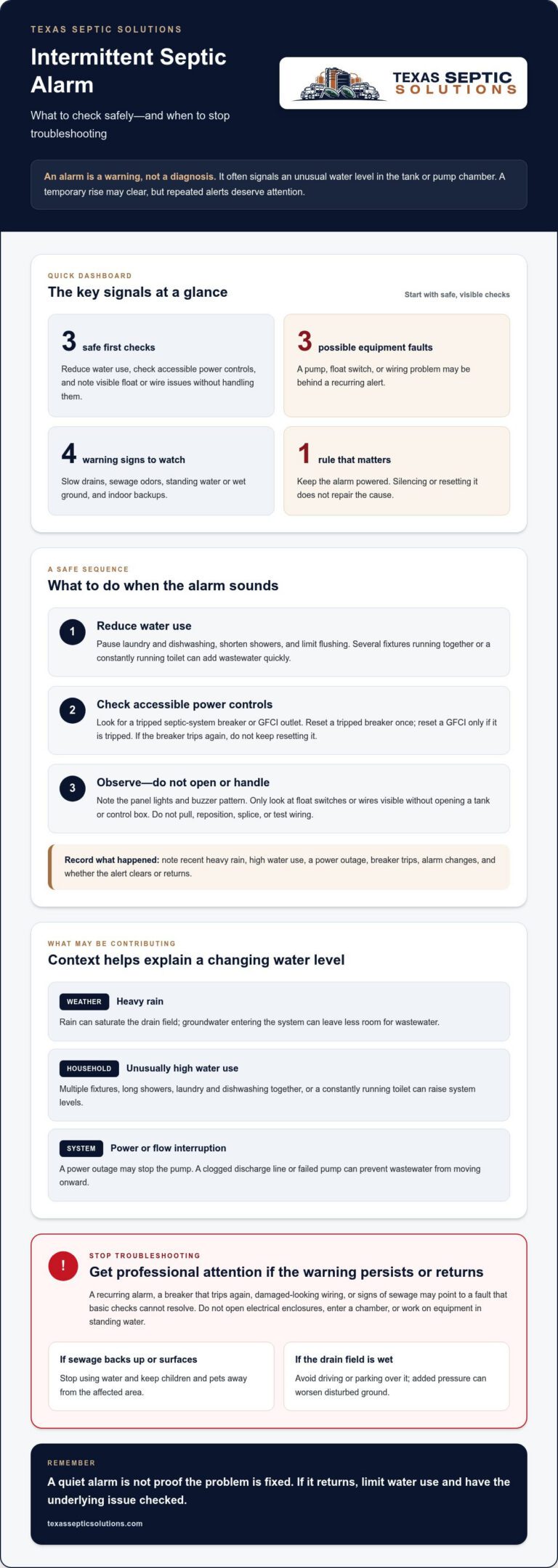
- Reduce water use when the alarm sounds, and consider whether heavy rain or unusually high household use may have raised system levels.
- Check for a tripped breaker or GFCI outlet, but don’t switch off the alarm in a way that cuts power to the septic system.
- Repeated alerts can point to a pump, float switch, or wiring problem; avoid opening or handling electrical components.
- Watch for slow drains, sewage odors, wet ground, or backups, and limit water use if symptoms appear.
- If the alarm persists or returns after basic checks, arrange septic repair rather than relying on silencing or resetting the alarm.
Why is My Septic Tank Alarm Going Off?
An alarm usually signals an unusual water level in the septic tank or pump chamber. Use these steps to relate the warning to recent water use, weather, and visible alarm indicators.
-
Understand Alarm Water-Level Monitoring
Locate the alarm panel and note its indicators without opening it. A septic alarm monitors water levels in the tank or pump chamber. A level that rises too high or falls too low can trigger a warning. Systems with pumps or advanced treatment components commonly use alarms to alert homeowners when wastewater levels need attention.
Consider what happened before the alert. Running the washing machine and dishwasher together, taking long showers, or using several fixtures can send wastewater into the system quickly. A constantly running toilet can also add water continuously. Pause laundry and dishwashing, shorten showers, and limit flushing while you observe the alarm.
-
Check for High Water in the Pump Chamber
Look for safe, visible signs around the system, but don’t open the tank or enter the chamber. A high water level in the pump chamber may mean the pump isn’t moving wastewater onward. A clogged discharge line or failed pump can also leave wastewater with nowhere to go, raising the level and triggering an alarm.
Think about recent weather and household water use. Heavy rain can saturate the drain field, while groundwater entering the system can leave less room for wastewater. High water use can add to the load at the same time. Rain may saturate the drain field, a power outage may stop the pump, and excess household water can raise levels quickly, each triggering an intermittent alarm.
Reduce water use and note whether the warning clears or returns. Avoid driving or parking over a wet drain field, where extra pressure can worsen disturbed ground. If sewage backs up indoors or wastewater surfaces in the yard, stop using water and keep children and pets away from the affected area.
-
Interpret Common Alarm Lights and Sounds
Check which indicators are active on the panel and note when the buzzer sounds. A buzzer or flashing light signals an alarm condition, often related to a high or low water level. The exact meaning depends on the system’s control panel, so don’t assume a particular light color identifies the same fault on every septic system.
A septic alarm that stops and returns deserves attention, even if the system seems normal between alerts. Record whether the light stays on, flashes, or changes when the buzzer sounds. Note recent heavy rain, high water use, or a power outage, too. These details can help distinguish a temporary rise in water level from a persistent pump or flow problem.
Silencing or resetting the alarm isn’t a repair. If the alarm persists or returns, or you notice slow drains, sewage odors, standing water, or a backup, limit household water use and arrange professional attention.
Checking breakers, float switches, and wires
Check accessible power controls first when the septic alarm sounds. A tripped breaker or GFCI can cut power to the pump and let wastewater levels rise.
In Huffman, distinguish a reset at an accessible breaker or GFCI from electrical or septic-system repair. These are basic checks, not a determination of permit requirements for repair work.
-
Check the Septic System Breaker and GFCI Outlet
Look at the breaker panel for a tripped circuit serving the septic system. If it has tripped, reset it once, then see whether the alarm returns. Check nearby GFCI outlets that may power the control panel, and press reset only if an outlet is tripped. Don’t open electrical enclosures or touch exposed wiring.
-
Check for Power Outages and Tripped Breakers
Consider whether a recent outage could have stopped the septic pump. When power returns, check the system breaker and GFCI, then note whether the alarm clears or continues. A breaker that trips again points to an ongoing electrical or equipment issue. Don’t keep resetting it, because the pump may remain without reliable power.
-
Inspect Float Switches and Wires
Look only at float switches or wires visible without opening a tank or control box. A loose or disconnected alarm wire can cause a false alert, while a stuck float may fail to signal changing water levels. Don’t pull, reposition, splice, or test wiring yourself. Note anything visibly loose or damaged for the repair technician.
- Keep the alarm powered while checking the system. Don’t flip its switch just to stop the buzzer, as that can cut power to septic equipment. If the panel has separate alarm and pump controls, avoid changing unfamiliar settings. Note which light is on and whether the pump seems to run, without reaching into the tank or chamber.
Write down the sequence of events: power loss, breaker trip, alarm, and any reset. For example, an alarm that returns soon after a breaker reset differs from one that clears and stays off. These observations help show whether a power interruption or an ongoing fault needs attention.
- Stop homeowner checks if a breaker trips again, wiring looks damaged, or the alarm keeps returning. The septic pump or float switch may need repair, and repeated resets won’t correct the underlying fault. Limit water use while the alarm remains active, especially if drains slow or wastewater backs up indoors.
Keep children and pets away from exposed wires, wet equipment, or sewage near the system. Don’t work on electrical components in standing water. If basic checks don’t resolve the warning, arrange septic repair so the pump, float switch, and alarm wiring can be inspected safely.
Pump and float switch failures
A septic pump moves wastewater from the pump chamber toward the drain field. A pump or float switch failure can stop that movement and trigger an alarm, even if the system seemed normal earlier.
Contact a septic service technician when the alarm persists or returns, or when sewage backs up or surfaces outdoors. These signs can indicate a failure that needs professional attention.
- Note whether the alarm returns and whether the pump seems to run. A failed septic pump may leave wastewater in the chamber instead of moving it onward. The rising water level can trigger the alarm again after a reset. Record the alarm pattern and any changes in household drainage, but don’t open the chamber or try to operate the pump manually.
- Watch for signs that the system is struggling. Slow drains, gurgling pipes, sewage odors, standing water in the yard, and wet ground near the drain field all warrant attention. A backup in a sink, tub, or toilet is especially urgent. Stop using water if the system appears to be failing, and keep children and pets away from surfaced sewage.
- Understand what a float switch does before assuming the pump itself has failed. The switch responds to wastewater levels and helps control pump operation or signal an alarm. If it sticks, gets tangled, or becomes damaged, it may not respond as the level changes. That can trigger an alarm even when the pump still works, or prevent the pump from starting when needed.
- Keep clear of tank openings, electrical connections, and moving equipment. Pump problems can involve electrical failure, mechanical wear, aging equipment, or a malfunctioning float switch. Silencing the alarm or repeatedly resetting controls won’t reliably diagnose these faults. Instead, note visible warning signs and recent alarm behavior to help a technician narrow down the issue.
- Arrange professional repair if basic checks haven’t resolved the warning. A technician can assess whether the pump, float switch, wiring, or another system component needs attention. Don’t wait for indoor sewage to appear if the alarm continues or returns. If sewage is already backing up, stop household water use and seek emergency septic help promptly.
Common causes of septic alarms
Use the alarm pattern, household water use, and outdoor conditions to narrow down possible causes. Note what changed before the warning, then check for signs that need attention. For troubleshooting intermittent septic alarms in Huffman, a brief timeline can help relate alerts to local rainfall or household activity.
- Compare the alarm with recent water use. Several appliances running together, long showers, or a leaking toilet can send wastewater into the septic tank faster than the system can handle it. A toilet that keeps refilling adds water even when nobody is using fixtures. Pause laundry and dishwashing, shorten showers, and limit flushing while you see whether the alarm stops or returns.
If the alarm follows unusually heavy water use and clears as use drops, record the timing. A repeated warning despite reduced use points to another cause, such as restricted flow or a pump problem.
- Relate the warning to recent rainfall. Heavy rain can saturate the drain field, and groundwater may enter the system, leaving less room for wastewater. Check the yard from a safe distance for soggy ground or standing water near the drain field. Avoid walking or driving over wet areas, and note whether the alarm began during or after the rain.
Rain-related saturation can coincide with household water use, adding to the system’s load. If wet ground persists or wastewater surfaces, keep people and pets away and arrange service.
- Watch for signs that wastewater isn’t moving through the system properly. Slow drains in several fixtures, gurgling pipes, or sewage odors can accompany high wastewater levels. A clogged discharge line may restrict flow, while a failing pump can leave wastewater in the pump chamber. Note which fixtures are affected and whether the alarm stays active.
A septic alarm doesn’t automatically mean the tank needs pumping. The warning may point to a pump, flow, or water-level issue, so consider other symptoms before assuming the tank is full.
- Record electrical or mechanical clues without opening equipment. A wiring short, tangled float, or burned-out pump motor can interfere with pumping and trigger an alarm. A stuck or damaged float switch may also signal incorrectly, even if the pump appears to operate. From a safe distance, note unusual pump sounds, recurring alarm cycles, and visible damage.
Don’t reach into the tank or handle exposed wires. These checks require access to equipment and electrical work, not trial-and-error adjustments at home.
- Treat a persistent warning promptly. A light that remains on after resetting the alarm, or a warning that repeats, can indicate an ongoing problem rather than a brief change in water level. Track alarm sounds and panel lights, along with changes in drainage or yard conditions. This timeline can relate the alarm to water use, rainfall, or equipment behavior.
If sewage backs up into a sink, tub, or toilet, stop using water and seek emergency septic help. Keep children and pets away from surfaced sewage, and don’t attempt cleanup without protective gloves and clothing. A clear record can help troubleshoot intermittent septic alarms in Huffman by showing whether alerts follow rain, water use, or other system symptoms.
Pump and float-switch malfunctions
A pump or float-switch fault can interrupt wastewater movement and trigger repeated alarms. Use these steps to distinguish visible warning signs from checks that require a technician.
- Track how the alarm behaves before changing anything. Note whether it sounds continuously, stops and returns, or stays active after a reset. Also record whether household drains slow or the pump makes an unusual sound. These clues can help distinguish an intermittent float response from a pump that isn’t moving wastewater out of the chamber.
Keep your notes together. A clear pattern is more useful than repeatedly silencing the alarm.
- Look for signs of a float-switch problem without opening the tank. A float can become stuck, tangled, or damaged, preventing it from responding normally as wastewater rises and falls. This may trigger an alarm even when the pump works. Don’t reach into a tank or try to move a submerged float. Record the alarm pattern and leave inspection to a technician.
A false alarm and a high water level can sound alike, so check for other symptoms.
- Consider pump failure if the alarm accompanies rising wastewater levels or recurring drainage trouble. Electrical faults, mechanical issues, aging equipment, and switch malfunctions can all interfere with pump operation. A pump that can’t move wastewater leaves it in the chamber, where the level can rise and trigger another warning. Don’t assume a brief return to normal means the fault has cleared.
Record any breaker trips or power interruptions alongside the alarm timeline.
- Watch for serious signs that need prompt attention. Sewage backing up into a sink, tub, or toilet, standing water near the system, or wet ground around the drain field can signal a developing failure. Stop using water if sewage is backing up, and keep children and pets away from surfaced wastewater. Don’t attempt to repair electrical equipment or clean sewage without protective clothing and gloves.
- Arrange a professional assessment when the alarm continues, returns after resetting, or accompanies a backup or wet ground. A technician can determine whether the pump, float switch, wiring, or another component needs repair. The right fix depends on the fault, so avoid replacing parts based only on a sound or light. Keep your notes ready, including alarm changes and drainage symptoms.
For recurring alarms or suspected pump and float-switch faults, arrange septic system repair to address the equipment problem rather than simply silencing the warning.
Texas Septic Solutions: New Septic System Installation
Texas Septic Solutions provides Septic System Repair when an alarm keeps returning or pump and float-switch problems disrupt wastewater flow. A technician can assess the system and identify the repair needed. For recurring problems, Septic System Maintenance can support ongoing system care; Septic System Pumping is available when pumping is appropriate. If the system needs replacement, Texas Septic Solutions also provides New Septic System Installation.
Share the alarm pattern and any warning signs, such as slow drains or wet ground, when you get in touch. Contact Texas Septic Solutions to discuss your septic system needs.
Take the Next Step Toward a Reliable System
Use your alarm notes to start a clearer repair conversation. The pattern of warnings, changes in drainage, and visible yard conditions can help focus attention on what your system needs next. If the issue keeps returning, don’t let repeated resets become routine.
Texas Septic Solutions provides Septic System Repair for equipment and system problems, along with Septic System Maintenance for ongoing care. If a system needs replacing, the company also offers New Septic System Installation. The right next step depends on what the system is showing, so share the symptoms and alarm history when you reach out.
For help with troubleshooting intermittent septic alarms in Huffman, contact Texas Septic Solutions to discuss your system. A clear next step can help you move from uncertainty toward a practical plan.
Frequently Asked Questions
Can Septic Alarm Problems Be Fixed the Same Day?
Some septic alarm problems can be addressed promptly, but a same-day fix depends on the cause and repair needed. Texas Septic Solutions offers 24/7 service, including emergency septic service for urgent failures. A simple control issue differs from a failed pump or damaged component. When contacting a technician, describe the alarm pattern, any sewage backup, and whether household drains have changed. These details help explain the situation clearly.
Should I Stop Using Water If My Septic Alarm Goes Off?
Reduce water use as soon as the alarm sounds, and stop using water if sewage backs up or the system appears to be failing. For example, postpone laundry and dishwashing rather than adding several wastewater loads. If sewage surfaces outdoors, keep children and pets away. Avoid cleanup without protective gloves and clothing. Limiting water helps prevent adding wastewater while you arrange next steps.
What causes an intermittent septic tank alarm?
An alarm that comes and goes can reflect changing wastewater levels or an intermittent equipment fault. A leaking toilet may add water continuously, while a stuck float, wiring problem, or pump malfunction can disrupt normal alarm or pump operation. Note whether alerts follow heavy rain, appliance use, or a power interruption. In Huffman, comparing these events can help distinguish a temporary trigger from a recurring system issue.
How can I safely troubleshoot a septic alarm that comes and goes?
Start with observations, not tank access. Record when the buzzer sounds, which panel light appears, and what was happening in the home beforehand. Check the yard from a safe distance for standing water, and note unusual odors or drainage changes. Keep the alarm system powered, avoid opening electrical enclosures, and don’t enter or reach into a septic tank. Share your observations during a service call.
How do I check a septic pump, float switch, and circuit breaker?
Check only accessible controls and visible components. Look for a tripped septic-system breaker or GFCI outlet, then reset it once if safe. If it trips again, stop resetting it. Observe visible wiring and float-switch areas without touching or repositioning anything. Sound alone can’t reliably confirm that a pump is working, so note what you observe and leave equipment testing or internal inspection to a septic technician.
What should homeowners avoid doing when a septic alarm is active?
Don’t silence the alarm and assume the fault is fixed, switch off unfamiliar controls, or repeatedly reset a breaker that trips again. Avoid opening the pump chamber, handling exposed wires, or reaching for a float switch. Don’t drive over wet ground near the drain field. If wastewater surfaces, keep people and pets away. Avoid direct contact and unprotected cleanup while arranging professional help.