
How to Check a Septic Pump Reset and Short Cycling in Huffman
A reset may restore power, but it won’t fix the cause of a septic pump starting and stopping too often. Troubleshooting septic pump short cycling in Huffman starts with checking the electrical panel for a tripped breaker. If it trips again or the pump won’t keep running after a reset, stop and arrange a professional diagnosis. A stuck or poorly set float switch may be causing the cycling.
A single reset may be reasonable when the pump stops, but repeated starts and stops are a reason to look beyond the reset. This guide covers common causes, safe checks you can make, and when to stop troubleshooting and call a professional.
We’ll focus on the float switch and other possible causes, then cover safe first steps and signs of clogs, electrical trouble, or excessive water use. You’ll also learn why opening the septic tank is not a DIY troubleshooting step, and how to recognize when the pump needs a professional diagnosis.
Key Takeaways
- Check for a tripped breaker and note whether the pump keeps running after a reset; repeated trips call for professional diagnosis.
- Learn how debris, wipes, grease, or a leaking check valve can interfere with pump operation.
- Reduce water use if you suspect pump failure to help lower the risk of sewage backing up.
- Watch for float-switch problems, including a float that sticks or activates at the wrong water level.
- Keep clear of the septic tank and get help when cycling continues, the pump won’t run normally, or you suspect a blockage.
Clogs and blockages from solids, wipes, and grease
If the pump starts and stops repeatedly, check for signs of restricted flow before trying a reset. A blockage can interfere with wastewater moving to or from the pump.
-
Identify solids, wipes, and grease clogs
Look for changes in drainage, such as a toilet or sink that empties slowly. Note whether several fixtures show trouble or one fixture does. Solids, wipes, and grease can collect in wastewater paths and restrict flow. Don’t flush wipes or pour cooking grease down drains. Avoid reaching into wastewater or opening the tank to search for a clog.
-
Check for blocked water lines
Compare drainage at different fixtures, such as a bathroom sink, toilet, and laundry drain. If only one drains poorly, the restriction may be near that fixture. If several have similar symptoms, the issue may involve a shared line or the septic system. Record which drains are affected and whether the pump cycles during use. Don’t dismantle pipes or force a blockage farther into the line.
- Observe the pump’s pattern from a safe location. Note whether it starts after water use, runs briefly, or stops before wastewater drains normally. A short cycle alone doesn’t identify the cause, so compare its timing with other symptoms. For example, slow drainage at several fixtures points to a different area of concern than one isolated slow sink.
- From a safe location, check the accessible area around the pump system for visible wastewater or signs of overflow. Don’t remove a tank lid or enter a septic space. Septic gases, including hydrogen sulfide and methane, can cause unconsciousness or death within seconds. Keep people away from any exposed opening, and avoid flames or sparks nearby.
- Reduce water use while documenting symptoms. Avoid running several water-using fixtures at once, and don’t repeatedly flush a toilet to test the pump. Continued water flow can add wastewater faster than a restricted system can move it. Record which fixtures were used, what drained slowly, and when the pump started or stopped.
- Check the ejection line and check valve for visible debris only if they’re accessible without opening the tank or handling electrical parts. Both need a clear path for wastewater to move through the discharge line. Don’t disconnect a line or valve to clear it yourself. A restriction or valve problem may need more than a visual check to diagnose.
- Call Texas Septic Solutions for professional diagnosis if several fixtures remain slow, wastewater appears, or short cycling continues. Share your observations rather than repeatedly resetting the pump. Include the affected drains, visible debris, and the pump’s start-and-stop pattern. These details can help narrow down whether the problem involves a blockage, discharge restriction, or another pump issue.
Electrical power and control panel problems
Use the control panel and the pump’s behavior to help identify possible electrical trouble. Check only accessible controls, and leave wiring and septic tank components untouched.
-
Inspect electrical power and the control panel
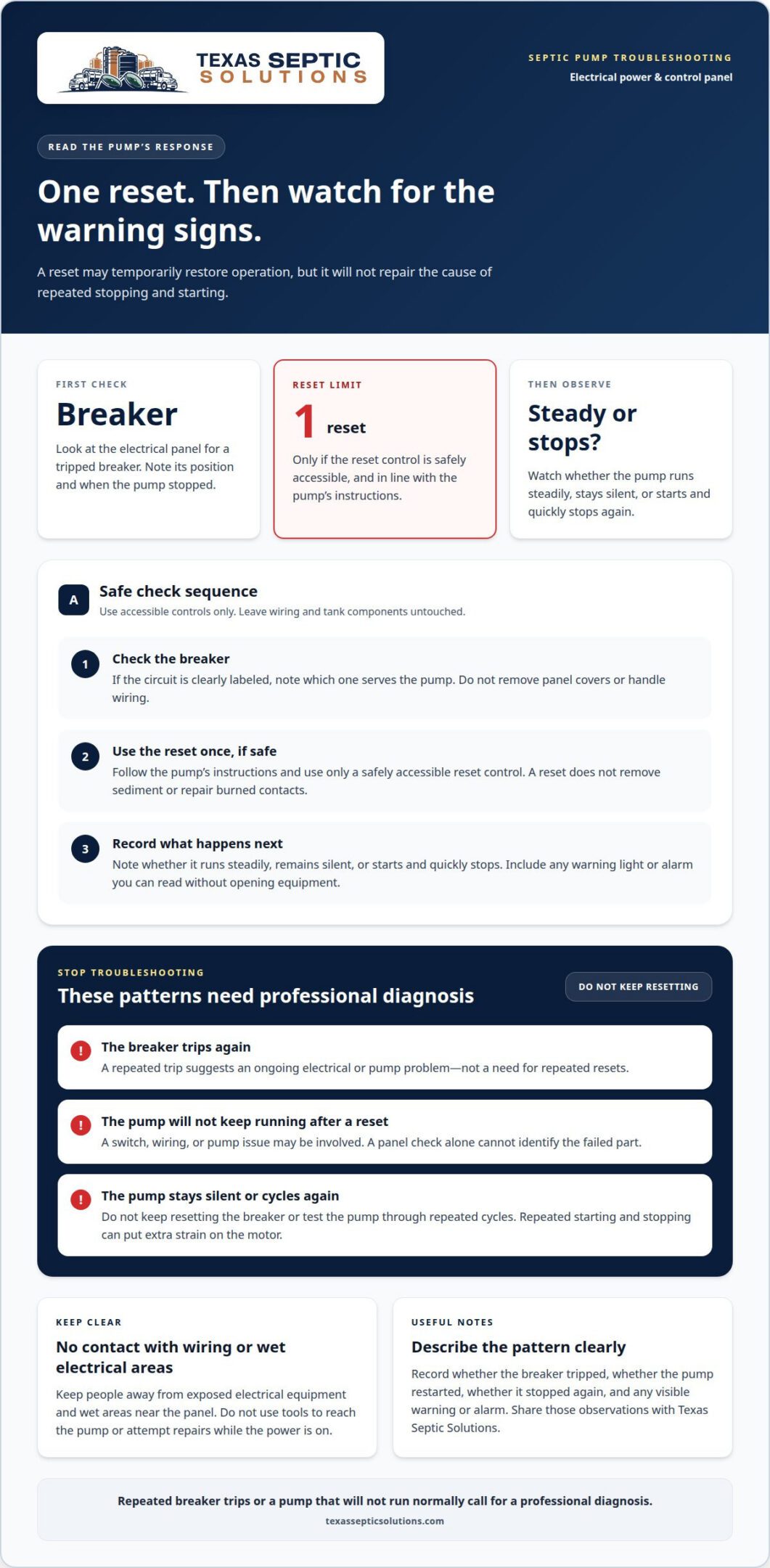
Check the electrical panel for a tripped breaker, then note which circuit serves the pump if it’s clearly labeled. If the breaker trips again, that suggests an ongoing electrical or pump problem, not a need for repeated resets. Don’t open the septic tank, remove panel covers, or handle wiring. Record the breaker’s position and when the pump stopped.
-
Check for pressure switch problems
Note whether the pump starts and stops at unusual intervals, but leave the pressure switch closed. Sediment can clog a pressure switch’s small orifices, while burned electrical contacts can interfere with its operation. Either problem may disrupt the pump’s controls. Don’t clean the switch, adjust its settings, or touch its contacts; diagnosing control equipment is a professional job.
- Reset only after checking the breaker and following the pump’s instructions. Use the reset control once if the equipment has one and it’s safely accessible. Observe whether the pump runs steadily or stops again. A reset may restore operation temporarily, but it won’t remove sediment or repair burned contacts.
- Keep a brief log of electrical symptoms. Note whether the breaker tripped, whether the pump restarted, and whether it stopped again. For example, “breaker tripped, reset once, pump stopped” describes the pattern more clearly than “pump acting up.” Include any warning light or alarm you can read without opening equipment.
- Note what happens after power returns to help distinguish an interruption from a control fault. If the pump stays silent, don’t keep resetting the breaker. If it starts and quickly stops, record that behavior instead of testing it through repeated cycles. Repeated starting and stopping can put extra strain on the pump motor.
- Stop troubleshooting and contact Texas Septic Solutions for a professional diagnosis if the breaker trips repeatedly or the pump won’t keep running after a reset. These symptoms may involve the switch, wiring, or pump, and a visual check at the panel can’t identify the failed part. Share your notes and how the pump responded to the single reset.
- Keep people away from exposed electrical equipment and wet areas near the panel. Don’t use tools to reach the pump or attempt repairs while the power is on. A professional diagnosis can distinguish a faulty pressure switch from another electrical problem without relying on repeated resets.
System overload from excessive water use or groundwater
In Huffman, apply relevant Texas and Harris County requirements to the specific repair; a reset doesn’t authorize system changes. Never open a septic tank: hydrogen sulfide and methane can cause unconsciousness or death within seconds.
- Reduce water use if you suspect pump failure. Pause laundry, long showers, and other nonessential water use to limit wastewater entering the system. If several fixtures run together, the added flow can increase demand on a pump that isn’t clearing wastewater normally. Keep a note of recent heavy water use, such as laundry followed by multiple showers.
- Watch for signs that the system is receiving more water than it can move. Note whether short cycling follows concentrated household use, or continues when water use is low. Groundwater entering a compromised system can add flow without normal indoor use. Record visible wet areas near the system, but don’t walk over soft ground or open equipment to investigate.
- Check household water-pressure symptoms separately from septic pump symptoms. If household water pressure is inconsistent and the water system has a pressure tank, use a gauge to check its pressure. A normal water-pump cycle starts when tank pressure drops too low and ends when the tank reaches its set pressure. That pressure cycle is different from a septic pump’s float-controlled operation.
- Compare the pressure reading with the tank’s rating, using the example of a tank rated for 60 psi. If it already has 40 psi of air pressure, the pump may shut off too early. Don’t change pressure settings based on that example alone. Record the gauge reading and tank rating, then keep those details separate from observations about septic pump cycling.
- Keep the septic tank closed while checking for signs of overload. Hydrogen sulfide and methane can build up inside septic spaces and cause unconsciousness or death within seconds. Don’t lean over an opening, enter a tank, or use a flame nearby. Check visible ground conditions only from a safe distance, and keep children and pets away from exposed openings.
- Follow the repair scope, not a guessed rule, before changing system components. Texas and Harris County requirements can depend on the particular repair and property. A reset is not a repair authorization. Avoid altering the pump, tank, or discharge setup yourself; document the symptoms and water-use pattern for a licensed septic professional.
- Stop using water if pump failure seems likely, especially if wastewater could back up. Note whether cycling continues after household use stops and whether household water pressure changes at the same time. These observations can help distinguish excess incoming flow, groundwater intrusion, and a pressure-tank issue from a septic pump control problem.
Texas and Harris County requirements depend on the specific repair and property. Have a licensed septic professional assess the work before changing system components; resetting the system does not authorize those changes.
When to contact a licensed septic professional
Use these steps to decide when a reset is no longer enough and professional diagnosis is needed.
- Call Texas Septic Solutions if the pump trips repeatedly or won’t keep running after a reset. For Huffman homeowners, professional septic system repair can help identify the cause of pump failure. Repeated resets won’t reveal the problem, and the pump may stop again once wastewater enters the system.
- Stop using water if you suspect pump failure. Pause laundry, showers, and other nonessential water use to reduce incoming wastewater and lower the risk of sewage backing up. Note whether the pump stopped during heavy household use or while water use was low. Share that timing with the professional.
- Arrange a professional diagnosis if short cycling continues after you’ve made safe observations. Record whether the pump starts and stops quickly, stays silent, or runs without moving wastewater normally. A stuck float, blocked discharge path, or control problem can cause overlapping symptoms. A professional can inspect the pump system rather than relying on a reset alone.
- Get help if you notice wastewater backing up, an overflow, or wet ground near the system. Avoid opening the septic tank or approaching exposed equipment. From a safe distance, describe the location and appearance of any visible wastewater. Don’t touch electrical components or enter a tank to locate the fault.
- Request an inspection if cycling changes or problems return after an apparent recovery. Septic pumps typically last 10 to 15 years, depending on usage and maintenance. Age alone doesn’t prove a pump has failed, but recurring symptoms deserve attention. Share the pump’s known age and any past maintenance details when arranging service.
- Keep routine care on the calendar, even when the pump seems to work normally. Most septic professionals recommend annual inspections for systems with pumps. An inspection can assess system condition and identify developing concerns before they become an urgent disruption. Keep any service records where you can find them during a repair visit.
- Prepare a concise symptom record before professional help arrives. Include when the problem began, how often the pump cycles, which fixtures were in use, and whether a breaker tripped. Note any reset attempts and what happened afterward. These observations can help focus the diagnosis on the pump, controls, or wastewater flow.
If you need guidance about the pump itself, the pump manufacturer can be contacted for advice using the pump paperwork, if available. Keep that paperwork accessible while arranging service, and use it to identify the manufacturer when you reach out. You can describe the symptoms you have observed and ask for advice about the pump, while relying on a licensed septic professional to diagnose recurring problems. If the paperwork is unavailable, do not delay seeking professional help while trying to locate it. Share any manufacturer advice you receive with the professional handling the inspection.
Septic pump short cycling and float switch malfunctions
Short cycling may result from a stuck or poorly calibrated float, a faulty switch, or water siphoning back past a check valve. A faulty check valve can cause repeated starts. There’s no single normal cycle time or tank level for every system; the pump should respond according to its design and float settings.
-
Identify short cycling and float switch malfunctions
If you’re troubleshooting septic pump short cycling in Huffman, record each start and stop from a safe location. Note nearby water use and whether the pump keeps running or stops quickly. A float stuck in the up position can keep the pump running and burn out its motor. Improper float calibration can activate the pump at incorrect levels or prevent it from cycling. Don’t open the tank or handle the float.
-
Consider a faulty check valve
Listen for repeated starts after the pump stops, and record the pattern. Water can siphon back through the discharge pipe past a faulty check valve, causing the pump to restart. A slightly leaking valve combined with a float set too low can also lead to short cycling. Don’t disconnect the valve to test it. Share the timing and symptoms with a professional.
-
Compare pump cycle times and tank levels
Record the time between starts and stops, then compare the pattern during ordinary household use. One reported ejector pump short-cycled every 10 minutes over the past few weeks. That example signals a pattern worth investigating, not a universal threshold. There’s no single normal cycle time or tank level for every setup. Don’t enter the tank to check its level.
- Notice whether toilet paper or other material is caught around a float that’s visible from a safe location. Accumulation can interfere with float movement, but don’t reach into a tank or wastewater to clear it. The float needs room to move and trigger the pump at the system’s intended levels. Keep observations to what you can see safely.
- Focus on what activates the pump, not just whether a reset works. An ejector pump runs when its float turns it on, so diagnosis should identify what moves or triggers the float. For Huffman homeowners troubleshooting septic pump short cycling, recorded start and stop times and water-use notes can help explain the pattern.
- Leave float testing and adjustment to a professional if cycling continues. A technician can assess the float’s cut-in and cut-out points, its movement, and the check valve. If the pump keeps starting and stopping, arrange septic system repair to address the underlying fault.
Improper calibration can cause incorrect-level cycling or failure to cycle; toilet paper may accumulate on the float. Lift/lower it, noting cut-in/cut-out; discharge-pipe siphoning past check valves repeatedly cycles ejector pumps, risking motor overheating or electrical issues.
Texas Septic Solutions: New Septic System Installation
Texas Septic Solutions provides septic system repair for Huffman homeowners dealing with repeated pump cycling, a float switch issue, or another suspected system fault. Repair can address the immediate problem; a new septic system installation is relevant when replacement is needed, rather than a pump adjustment alone.
Routine septic system maintenance and pumping can help homeowners keep system care on their calendar. The right next step depends on what’s causing the pump to start and stop, so share the symptoms you’ve observed, such as recurring cycles or a pump that won’t stay running.
Contact Texas Septic Solutions to discuss septic system repair or a new installation for your property.
Turn your observations into a clear next step
A practical next step for troubleshooting septic pump short cycling in Huffman is to turn your observations into a concise service record. Note when the problem happens, what the pump does, and whether household water use or other symptoms coincide. This gives the repair conversation a useful starting point, especially when it’s stressful to recall details.
Resist the urge to keep resetting or adjusting equipment to make the symptoms disappear. A short-term change won’t explain what caused the cycling, and a recurring issue deserves attention before it disrupts daily use. Share your notes and observations with a professional without opening the tank or handling components.
When you’re ready to discuss the next step, contact Texas Septic Solutions. A focused conversation can help you move from uncertainty toward a practical plan for your system. Start with what you’ve noticed, and take the next step with confidence.
Frequently Asked Questions
Can I reset my septic pump myself?
Yes, you can try a reset if the pump has a safe, accessible reset control and its instructions explain how to use it. Check the breaker first, then reset it once if needed. Don’t remove panel covers or reach into a tank. If the breaker trips again or the pump stops after restarting, stop resetting it and arrange a professional diagnosis. A reset restores power, but doesn’t fix the underlying fault.
What Are the Common Causes of Septic Tank Pump Failure?
Common causes include a stuck or poorly calibrated float, restricted wastewater flow, a faulty check valve, or an electrical control problem. Excessive incoming water can also strain system operation. These issues can produce similar symptoms, so a pump that hums, stops, or cycles abnormally doesn’t identify a failed part by itself. Note what happens and when, then share those observations during diagnosis.
How to test septic tank float switches and adjust their settings
Never open the septic tank or handle electrical parts to reach the float. If the float is visible from a safe location, note when the pump starts and stops, but leave any float adjustments to a licensed septic professional.